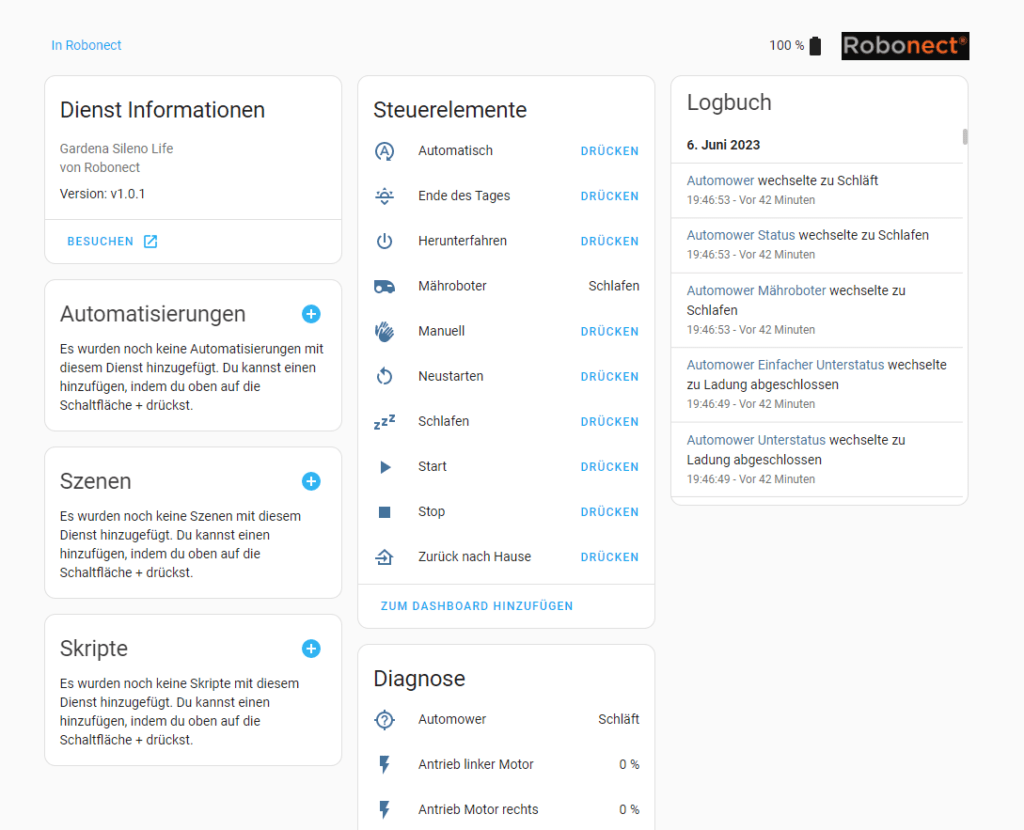
In diesem Beitrag zeige ich dir, wie du die Robonect Integration in Home Assistant hinzufügen kannst. Du besitzt einen Rasenmäherroboter von Husqvarna, Gardena oder Flymo und hast dir das Robonect Modul zugelegt, dann kannst du nun mit der Integration von Geert Meersmann (https://github.com/geertmeersman/robonect, Vielen Dank) deinen Mäher in Home Assistant hinzufügen.
Installation
Um die Integration in Home Assistant hinzufügen zu können, benötigst du den Home Assistant Community Store (HACS). Nach der Integration vom HACS klickst du auf HACS → Integrationen → rechts oben auf die drei Punkte (Hamburgermenü) → Benutzerdefinierte Repositories. Im folgenden Fenster trägst du unter Repository
geertmeersman/robonect
ein. Als Kategorie wählst du Integration aus. Anschließend fügst du die Repository hinzu.
Klicke nun auf der Integrationsseite vom HACS rechts unten auf Repository durchsuchen und herunterladen. Nun lädst du die Integration herunter. Nach dem Herunterladen muss Home Assistant neu gestartet werden.
Nach dem Neustart von Home Assistant kannst du über Einstellungen → Geräte & Dienste → Integration hinzufügen die Integration hinzufügen. Zuletzt musst du noch die Integration konfigurieren. Als Verbindungsmethode wählst du sowohl MQTT als auch REST API aus. Aus dem Menü wählst du dein Gerät aus und trägst die Gerätebezeichnung deines Mähers ein. Als Hostadresse trägst du die Adresse von deinem Robonect ein. Beim Benutzernamen und Passwort trägst du die Zugriffsdaten zu deinem Robonect ein. Als Topic trägst du den MQTT Topic zu deinem Mäher ein (Anleitung findest du hier). ! der Topic sollte nicht mit Großbuchstaben beginnen. Den Aktualisierungsintervall kannst du nach Belieben wählen.
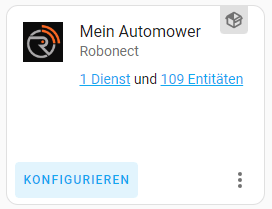
Nach einer kurzer Wartezeit wird nun die Robonect Integration in Home Assistant angezeigt.
Dashboard Karte
Möchtest du diese Dashboardkarte für deinen Rasenmäherroboter haben? Dann zeige ich dir nun die Installation.
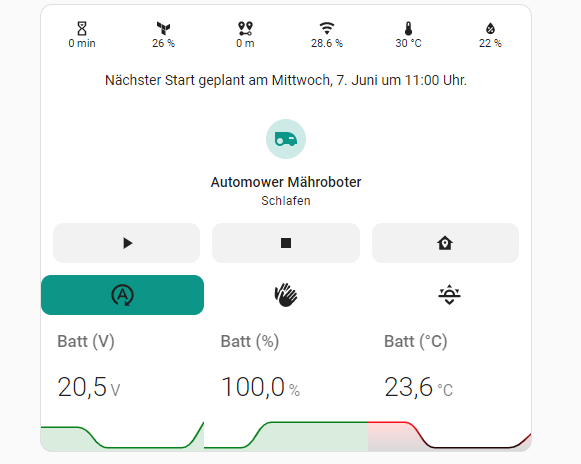
Für die Dashboardkarte benötigst du einige HACS Frontend Repositories.
- stack in Card
- mini-graph-card
- button-card
- card-mod
Alle benötigten Repositories kannst du über HACS → Frontend → Durchsuchen und Herunterladen von Repositories hinzufügen.
Um die Dashboardkarte deinem Dashboard hinzuzufügen, klickst du rechts oben auf die drei Punkte (im Dashboard) → Dashboard bearbeiten → Karte hinzufügen. Danach wählst du Manuell aus und fügst folgenden Code ein.
type: custom:stack-in-card
mode: vertical
keep:
  border_radius: true
cards:
  - type: horizontal-stack
    cards:
      - entity: sensor.automower_mower_status_duration
        show_entity_picture: true
        show_name: false
        font-size: 11px
        show_state: true
        show_label: true
        styles:
          card:
            - height: 40px
            - padding: 5px
            - margin-top: 10px
            - border-top: 1px solid var(--state-icon-color)
            - border: 0px solid var(--primary-background-color)
            - font-size: 11px
        type: custom:button-card
      - entity: sensor.automower_mower_blades_quality
        show_entity_picture: true
        show_name: false
        font-size: 11px
        show_state: true
        show_label: true
        styles:
          card:
            - height: 40px
            - padding: 5px
            - margin-top: 10px
            - border-top: 1px solid var(--state-icon-color)
            - border: 0px solid var(--primary-background-color)
            - font-size: 11px
        type: custom:button-card
      - entity: sensor.automower_mower_distance
        show_entity_picture: true
        show_name: false
        font-size: 11px
        show_state: true
        show_label: true
        styles:
          card:
            - height: 40px
            - padding: 5px
            - margin-top: 10px
            - border-top: 1px solid var(--state-icon-color)
            - border: 0px solid var(--primary-background-color)
            - font-size: 11px
        type: custom:button-card
      - entity: sensor.automower_wlan_rssi
        show_entity_picture: true
        show_name: false
        font-size: 11px
        show_state: true
        show_label: true
        styles:
          card:
            - height: 40px
            - padding: 5px
            - margin-top: 10px
            - border-top: 1px solid var(--state-icon-color)
            - border: 0px solid var(--primary-background-color)
            - font-size: 11px
        type: custom:button-card
      - entity: sensor.automower_health_climate_temperature
        show_entity_picture: true
        show_name: false
        font-size: 11px
        show_state: true
        show_label: true
        styles:
          card:
            - height: 40px
            - padding: 5px
            - margin-top: 10px
            - border-top: 1px solid var(--state-icon-color)
            - border: 0px solid var(--primary-background-color)
            - font-size: 11px
        type: custom:button-card
      - entity: sensor.automower_health_climate_humidity
        show_entity_picture: true
        show_name: false
        font-size: 11px
        show_state: true
        show_label: true
        styles:
          card:
            - height: 40px
            - padding: 5px
            - margin-top: 10px
            - border-top: 1px solid var(--state-icon-color)
            - border: 0px solid var(--primary-background-color)
            - font-size: 11px
        type: custom:button-card
  - type: conditional
    conditions:
      - entity: sensor.automower_mower_timer_next_unix
        state_not: Unknown
    card:
      type: markdown
      content: >
        {% set time =
        states.sensor.automower_mower_timer_next_unix.state|as_datetime %} {%
        set day = as_timestamp(time)|timestamp_custom('%d', true)|int %} {% set
        weekday = as_timestamp(time)|timestamp_custom('%w', true)|int %} {% set
        month = as_timestamp(time)|timestamp_custom('%m', true)|int -1 %} {% set
        weekday = ["Sonntag",
        "Montag","Dienstag","Mittwoch","Donnerstag","Freitag","Samstag"][weekday]
        %} {% set month = ["Januar",
        "Februar","März","April","Mai","Juni","Juli","August","September","Oktober","November","Dezember"][month]
        %} Nächster Start geplant am {{weekday}}, {{day}}. {{month}} {{
        as_timestamp(time)|timestamp_custom('um %H:%M Uhr.', true) }}
      card_mod:
        style: |
          ha-card {
            border-width: 0;
            text-align: center;
          }
  - type: tile
    entity: vacuum.automower_robonect
    show_entity_picture: true
    vertical: true
    features:
      - type: vacuum-commands
        commands:
          - start_pause
          - stop
          - return_home
    card_mod:
      style: |
        ha-card {
          border-width: 0;
        }
  - type: horizontal-stack
    style: |
      ha-card {
        margin-left: 10px;
      }
    cards:
      - show_name: false
        show_icon: true
        type: custom:button-card
        tap_action:
          action: call-service
          service: button.press
          service_data:
            entity_id: button.automower_auto
        entity: button.automower_auto
        styles:
          card:
            - height: 40px
            - border: 0px solid var(--primary-background-color)
            - background: |
                [[[
                  if (states['sensor.automower_mower_mode'].state == '0' )
                    return 'var(--state-vacuum-17-color, var(--state-vacuum-active-color, var(--state-active-color)))'
                  return ''
                ]]]
            - font-size: 11px
            - border-radius: 10px
            - '--keep-background': 'true'
      - show_name: false
        show_icon: true
        type: custom:button-card
        entity: button.automower_man
        tap_action:
          action: call-service
          service: button.press
          service_data:
            entity_id: button.automower_man
        styles:
          card:
            - height: 40px
            - border: 0px solid var(--primary-background-color)
            - background: |
                [[[
                  if (states['sensor.automower_mower_mode'].state == '1' )
                    return 'var(--state-vacuum-17-color, var(--state-vacuum-active-color, var(--state-active-color)))'
                  return ''
                ]]]
            - font-size: 11px
            - '--keep-background': 'true'
      - show_name: false
        show_icon: true
        type: custom:button-card
        tap_action:
          action: call-service
          service: button.press
          service_data:
            entity_id: button.automower_eod
        entity: button.automower_eod
        styles:
          card:
            - height: 40px
            - border: 0px solid var(--primary-background-color)
            - background: |
                [[[
                  if (states['sensor.automower_mower_mode'].state == '2' )
                    return 'var(--state-vacuum-17-color, var(--state-vacuum-active-color, var(--state-active-color)))'
                  return ''
                ]]]
            - font-size: 11px
            - '--keep-background': 'true'
  - type: horizontal-stack
    cards:
      - entities:
          - entity: sensor.automower_battery_0
            attribute: voltage
            unit: V
            index: 0
        show:
          icon: false
        font_size: 80
        name: Batt (V)
        decimals: 1
        animate: true
        color_thresholds:
          - value: 0
            color: red
          - value: 17
            color: orange
          - value: 19.3
            color: green
        type: custom:mini-graph-card
        card_mod:
          style: |
            ha-card {
              border-width: 0;
              border-radius: 0
            }
      - entities:
          - entity: sensor.automower_battery_0
            index: 0
        show:
          icon: false
        font_size: 80
        name: Batt (%)
        decimals: 1
        animate: true
        color_thresholds:
          - value: -2500
            color: red
          - value: -1000
            color: orange
          - value: 0
            color: green
        type: custom:mini-graph-card
        card_mod:
          style: |
            ha-card {
              border-width: 0;
              border-radius: 0
            }
      - entities:
          - entity: sensor.automower_battery_0
            attribute: temperature
            unit: °C
            index: 0
        show:
          state: true
          icon: false
        font_size: 80
        name: Batt (°C)
        decimals: 1
        animate: true
        color_thresholds:
          - value: 0
            color: red
          - value: 10
            color: green
          - value: 30
            color: red
        type: custom:mini-graph-card
        card_mod:
          style: |
            ha-card {
              border-width: 0;
              border-radius: 0
            }
Änderungsprotokoll
06/2023: Veröffentlichung des Beitrages
Hallo,
was bewirken denn die beiden Button „Hände“ und „Sonnenuntergang“?
Danke und Grüße
Duc
Hände ist der manuelle Modus. Sonnenuntergang ist der Modus Feierabend. Der Roboter startet am nächsten Tag mit dem ganz normalen Programm.
Die Verbindung zum Robi konnte ich herstellen. Wenn ich jedoch deinen Code kopiere und einstelle, erscheinen bei mir nur die drei Werte der Battery. Der Rest wird nicht erkannt. ich habe folgende Fehlermeldung vacuum.automower_robonect – Entität nicht gefunden und ein Großteil, der im Code beschriebenen Entitäten werden mir gar nicht als Sensor zur Verfügung gestellt. Fehlt mir noch etwas? BG
Danke! Super Integration, sehr hilfreich
Hi,
hat super funktioniert.
Was aber mega wäre, wäre eine Anleitung wie ich über Homeassistant einen manuellen Mähauftrag erstellen kann wie bei der robonect app.
Hallo, ich habe das gleiche Problem wie Shaun es bereits am 11. Juni 2023 beschrieben hat. Ich habe in der Robonect Integration auch nur 24 Entitäten und nicht wie oben aufgeführt über 100.
Wo liegt denn mein Fehler? Beste Grüße und vielen Dank vorab.
Vielen Dank, hat super geklappt
Bei mir erscheinen ebenfalls nur 24 Entitäten, kann mir jemand sagen wo der Fehler liegt.
Hi,
bin hier über deine Youtube Anleitung hergekommen, leider scheint das Tutorial mit der aktuellen HA nicht mehr so richtig zu funktionieren, einige Menüs haben sich wohl geändert, nun habe ich unter HACS zwar „Robonect Home Assistant integration for Robonect Typ Integration“ aber unter „Geräten und Diensten“ taucht Robonect nur innerhalb von HACS auf. Das sieht dann so aus, wie im Anhang.
Was genau fehlt denn jetzt genau? HA habe ich schon mehrfach neu booten lassen aber es ändert nichts.
Danke vorab.
Servus, seit dem neuen HACS update ist ein Fehler in deiner schönen Dashboard Card aufgetaucht und zwar zeigt es in der Mitte wo der Status des Mähers anzeigt werden soll „vacuum.automower_robonect Entität nicht gefunden“.
Hast du nen Tipp welche Entität das jetzt rein muss?
ich habe einen Automover 315X
beim Versuch die Karte anzulegen kommt folgender Fehler
vacuum.automover_robonect
Entität nicht gefunden
wo liegt bitte der Fehler?
Das Problem liegt am Script. Aktuell überarbeite ich den Beitrag.
„lawn_mower.automower_robonect“ mit dieser Entität läuft die Karte wieder wie gehabt
Hallo,
kannst du das bitte etwas genauer beschreiben. Weiss nicht genau was ich hier tun muss.
Danke Dir
Oliver
Hallo,
danke für die Mühe! Ich habe auch das oben beschriebene Problem mit dem Dashboard und den vacuum-commands. Gibt es hier ein Update für das Skript?
Vielen dank.
Aktuell überarbeiteich das Skript. Leider habe ich aktuell wenig Zeit.
Vielen Dank für die super Aufbereitung und der hohen Qualität.
Leider funktioniert bei meinem Automower 305 und der neuen HOAS 2024 nicht so alles.
Nachfolgende entity’s sind in der neuen HOAS 2024 nicht vorhanden:
– entity: sensor.automower_mower_status_duration
– entity: sensor.automower_mower_blades_quality
– entity: sensor.automower_mower_distance
– entity: sensor.automower_health_climate_temperature
– entity: sensor.automower_health_climate_humidity
– entity: sensor.automower_mower_timer_next_unix
– states.sensor.automower_mower_timer_next_unix.state|as_datetime
– entity: vacuum.automower_robonect
– sensor.automower_mower_mode
Leider kann ich dir meine 271 KB PDF – Datei nicht übermitteln, da immer wieder eine Fehlermeldung (ERROR: WordPress doesn’t allow this type of uploads.) kommt.
Liebe Grüsse Roland
Original damit:
https://github.com/geertmeersman/robonect
funktioniert bei mir einwandfrei mit einem 315X!
type: custom:stack-in-card
mode: vertical
keep:
border_radius: true
margin: true
outer_padding: false
cards:
# ═══════════════════════════════════════════════
# HEADER – Bubble Card Titel
# ═══════════════════════════════════════════════
– type: custom:bubble-card
card_type: separator
name: 🤖 Husqvarna Automower 440
icon: mdi:robot-mower-outline
styles: |
.bubble-separator {
background: linear-gradient(135deg, #1a6b2a 0%, #2d9e42 100%);
border-radius: 16px !important;
margin-bottom: 4px;
}
.bubble-separator-name {
font-size: 18px;
font-weight: 700;
color: white !important;
}
.bubble-icon {
color: white !important;
}
# ═══════════════════════════════════════════════
# STATUS CHIPS – Mushroom Chips Row
# ═══════════════════════════════════════════════
– type: custom:mushroom-chips-card
chips:
– type: entity
entity: binary_sensor.automower_mower_stopped
icon_color: red
content_info: state
tap_action:
action: none
– type: entity
entity: binary_sensor.automower_health_alarm
icon_color: orange
content_info: state
tap_action:
action: none
– type: entity
entity: binary_sensor.automower_mower_error
icon_color: red
content_info: state
tap_action:
action: none
– type: entity
entity: sensor.automower_wire
icon: mdi:check-network
icon_color: green
content_info: state
tap_action:
action: none
– type: entity
entity: binary_sensor.automower_weather_data_break
icon_color: blue
content_info: state
tap_action:
action: none
alignment: center
card_mod:
style: |
ha-card {
background: transparent;
box-shadow: none;
padding: 4px 0;
}
# ═══════════════════════════════════════════════
# HAUPTSTEUERUNG – Button-Card Grid
# ═══════════════════════════════════════════════
– type: custom:stack-in-card
mode: vertical
keep:
border_radius: true
card_mod:
style: |
ha-card {
background: var(–card-background-color);
border-radius: 16px;
padding: 8px;
margin: 4px 0;
}
cards:
– type: markdown
content: „### 🎮 Steuerung“
card_mod:
style: |
ha-card { background: transparent; box-shadow: none; padding: 0 8px; }
h3 { margin: 4px 0 8px 0; color: var(–primary-text-color); font-size: 14px; }
– type: horizontal-stack
cards:
– type: custom:button-card
entity: button.automower_auto
name: Auto
icon: mdi:refresh-auto
tap_action:
action: call-service
service: button.press
service_data:
entity_id: button.automower_auto
styles:
card:
– background: „linear-gradient(135deg, #1a6b2a, #2d9e42)“
– border-radius: 14px
– height: 70px
– color: white
– font-size: 12px
– font-weight: 600
– box-shadow: „0 4px 12px rgba(45,158,66,0.4)“
icon:
– color: white
– width: 28px
name:
– color: white
– type: custom:button-card
entity: button.automower_start
name: Start
icon: mdi:play-circle
tap_action:
action: call-service
service: button.press
service_data:
entity_id: button.automower_start
styles:
card:
– background: „linear-gradient(135deg, #1565c0, #1976d2)“
– border-radius: 14px
– height: 70px
– color: white
– font-size: 12px
– font-weight: 600
– box-shadow: „0 4px 12px rgba(25,118,210,0.4)“
icon:
– color: white
– width: 28px
name:
– color: white
– type: custom:button-card
entity: button.automower_stop
name: Stop
icon: mdi:stop-circle
tap_action:
action: call-service
service: button.press
service_data:
entity_id: button.automower_stop
styles:
card:
– background: „linear-gradient(135deg, #b71c1c, #e53935)“
– border-radius: 14px
– height: 70px
– color: white
– font-size: 12px
– font-weight: 600
– box-shadow: „0 4px 12px rgba(229,57,53,0.4)“
icon:
– color: white
– width: 28px
name:
– color: white
– type: horizontal-stack
cards:
– type: custom:button-card
entity: button.automower_home
name: Heimfahrt
icon: mdi:home-import-outline
tap_action:
action: call-service
service: button.press
service_data:
entity_id: button.automower_home
styles:
card:
– background: „linear-gradient(135deg, #4a148c, #7b1fa2)“
– border-radius: 14px
– height: 70px
– color: white
– font-size: 12px
– font-weight: 600
– box-shadow: „0 4px 12px rgba(123,31,162,0.4)“
icon:
– color: white
– width: 28px
name:
– color: white
– type: custom:button-card
entity: button.automower_eod
name: Ende heute
icon: mdi:weather-sunset-down
tap_action:
action: call-service
service: button.press
service_data:
entity_id: button.automower_eod
styles:
card:
– background: „linear-gradient(135deg, #e65100, #f57c00)“
– border-radius: 14px
– height: 70px
– color: white
– font-size: 12px
– font-weight: 600
– box-shadow: „0 4px 12px rgba(245,124,0,0.4)“
icon:
– color: white
– width: 28px
name:
– color: white
– type: custom:button-card
entity: button.automower_man
name: Manuell
icon: mdi:hand-clap
tap_action:
action: call-service
service: button.press
service_data:
entity_id: button.automower_man
styles:
card:
– background: „linear-gradient(135deg, #37474f, #546e7a)“
– border-radius: 14px
– height: 70px
– color: white
– font-size: 12px
– font-weight: 600
– box-shadow: „0 4px 12px rgba(84,110,122,0.4)“
icon:
– color: white
– width: 28px
name:
– color: white
# ═══════════════════════════════════════════════
# MOTOR GRAPHEN – mini-graph-card
# ═══════════════════════════════════════════════
– type: custom:stack-in-card
mode: vertical
keep:
border_radius: true
card_mod:
style: |
ha-card {
background: var(–card-background-color);
border-radius: 16px;
padding: 8px;
margin: 4px 0;
}
cards:
– type: markdown
content: „### ⚙️ Motoren“
card_mod:
style: |
ha-card { background: transparent; box-shadow: none; padding: 0 8px; }
h3 { margin: 4px 0 8px 0; color: var(–primary-text-color); font-size: 14px; }
– type: horizontal-stack
cards:
– type: custom:mini-graph-card
entity: sensor.automower_motor_drive_left
name: Motor Links
icon: mdi:chevron-left-circle
show:
icon: true
name: true
state: true
graph: line
fill: true
font_size: 75
line_color: „#2d9e42“
line_width: 2
animate: true
decimals: 0
card_mod:
style: |
ha-card { border-width: 0; border-radius: 12px; }
– type: custom:mini-graph-card
entity: sensor.automower_motor_drive_right
name: Motor Rechts
icon: mdi:chevron-right-circle
show:
icon: true
name: true
state: true
graph: line
fill: true
font_size: 75
line_color: „#1976d2“
line_width: 2
animate: true
decimals: 0
card_mod:
style: |
ha-card { border-width: 0; border-radius: 12px; }
– type: custom:mini-graph-card
entity: sensor.automower_motor_blade
name: Messer
icon: mdi:fan
show:
icon: true
name: true
state: true
graph: line
fill: true
font_size: 75
line_color: „#f57c00“
line_width: 2
animate: true
decimals: 0
card_mod:
style: |
ha-card { border-width: 0; border-radius: 12px; }
# ═══════════════════════════════════════════════
# DRAHTQUALITÄT – ApexCharts
# ═══════════════════════════════════════════════
– type: custom:apexcharts-card
header:
show: true
title: 📡 Drahtqualität (Verlauf)
show_states: true
colorize_states: true
graph_span: 6h
series:
– entity: sensor.automower_wire
name: Drahtqualität
color: „#2d9e42“
stroke_width: 2
fill_raw: last
card_mod:
style: |
ha-card {
border-radius: 16px;
margin: 4px 0;
}
# ═══════════════════════════════════════════════
# DIAGNOSE – Mushroom Entity Cards
# ═══════════════════════════════════════════════
– type: custom:stack-in-card
mode: vertical
keep:
border_radius: true
card_mod:
style: |
ha-card {
background: var(–card-background-color);
border-radius: 16px;
padding: 8px;
margin: 4px 0;
}
cards:
– type: markdown
content: „### 🔍 Diagnose“
card_mod:
style: |
ha-card { background: transparent; box-shadow: none; padding: 0 8px; }
h3 { margin: 4px 0 8px 0; color: var(–primary-text-color); font-size: 14px; }
– type: horizontal-stack
cards:
– type: custom:mushroom-entity-card
entity: binary_sensor.automower_health_alarm
name: Gesundheit
icon: mdi:heart-pulse
icon_color: green
tap_action:
action: none
card_mod:
style: |
ha-card { border-radius: 12px; }
– type: custom:mushroom-entity-card
entity: binary_sensor.automower_mower_error
name: Fehler
icon: mdi:alert-octagon
icon_color: red
tap_action:
action: none
card_mod:
style: |
ha-card { border-radius: 12px; }
– type: custom:mushroom-entity-card
entity: binary_sensor.automower_mower_stopped
name: Gestoppt
icon: mdi:stop
icon_color: orange
tap_action:
action: none
card_mod:
style: |
ha-card { border-radius: 12px; }
– type: horizontal-stack
cards:
– type: custom:mushroom-entity-card
entity: sensor.automower_wire
name: Draht %
icon: mdi:check-network
icon_color: green
tap_action:
action: none
card_mod:
style: |
ha-card { border-radius: 12px; }
– type: custom:mushroom-entity-card
entity: sensor.automower_mower_error
name: Akt. Fehler
icon: mdi:alert
icon_color: red
tap_action:
action: none
card_mod:
style: |
ha-card { border-radius: 12px; }
– type: custom:mushroom-entity-card
entity: sensor.automower_service_call_result
name: Letzter Call
icon: mdi:api
icon_color: blue
tap_action:
action: none
card_mod:
style: |
ha-card { border-radius: 12px; }
# ═══════════════════════════════════════════════
# KONFIGURATION – Bubble Popup + Entities
# ═══════════════════════════════════════════════
– type: custom:stack-in-card
mode: vertical
keep:
border_radius: true
card_mod:
style: |
ha-card {
background: var(–card-background-color);
border-radius: 16px;
padding: 8px;
margin: 4px 0;
}
cards:
– type: markdown
content: „### ⚙️ Konfiguration & Wartung“
card_mod:
style: |
ha-card { background: transparent; box-shadow: none; padding: 0 8px; }
h3 { margin: 4px 0 8px 0; color: var(–primary-text-color); font-size: 14px; }
– type: custom:mushroom-entity-card
entity: switch.automower_winter_mode
name: Wintermodus
icon: mdi:snowflake
icon_color: blue
tap_action:
action: toggle
card_mod:
style: |
ha-card { border-radius: 12px; margin-bottom: 4px; }
– type: horizontal-stack
cards:
– type: custom:button-card
entity: button.automower_sync_clock
name: Uhr sync
icon: mdi:clock-check
tap_action:
action: call-service
service: button.press
service_data:
entity_id: button.automower_sync_clock
styles:
card:
– height: 56px
– border-radius: 12px
– font-size: 11px
– background: „rgba(var(–rgb-primary-color), 0.1)“
icon:
– width: 22px
– type: custom:button-card
entity: button.automower_blades_reset
name: Messer reset
icon: mdi:backup-restore
tap_action:
action: call-service
service: button.press
service_data:
entity_id: button.automower_blades_reset
styles:
card:
– height: 56px
– border-radius: 12px
– font-size: 11px
– background: „rgba(var(–rgb-primary-color), 0.1)“
icon:
– width: 22px
– type: custom:button-card
entity: button.automower_error_reset
name: Fehler reset
icon: mdi:alert-remove
tap_action:
action: call-service
service: button.press
service_data:
entity_id: button.automower_error_reset
styles:
card:
– height: 56px
– border-radius: 12px
– font-size: 11px
– background: „rgba(var(–rgb-primary-color), 0.1)“
icon:
– width: 22px
– type: horizontal-stack
cards:
– type: custom:button-card
entity: button.automower_sleep
name: Schlafen
icon: mdi:sleep
tap_action:
action: call-service
service: button.press
service_data:
entity_id: button.automower_sleep
styles:
card:
– height: 56px
– border-radius: 12px
– font-size: 11px
– background: „rgba(var(–rgb-accent-color), 0.1)“
icon:
– width: 22px
– type: custom:button-card
entity: button.automower_reboot
name: Neustart
icon: mdi:restart
tap_action:
action: call-service
service: button.press
service_data:
entity_id: button.automower_reboot
styles:
card:
– height: 56px
– border-radius: 12px
– font-size: 11px
– background: „rgba(255,152,0,0.15)“
icon:
– width: 22px
– color: orange
– type: custom:button-card
entity: button.automower_shutdown
name: Ausschalten
icon: mdi:power
tap_action:
action: call-service
service: button.press
service_data:
entity_id: button.automower_shutdown
styles:
card:
– height: 56px
– border-radius: 12px
– font-size: 11px
– background: „rgba(244,67,54,0.15)“
icon:
– width: 22px
– color: red
# ═══════════════════════════════════════════════
# FOOTER – Firmware Info
# ═══════════════════════════════════════════════
– type: custom:mushroom-entity-card
entity: sensor.automower_version_application
name: Firmware
icon: mdi:tag-outline
icon_color: grey
secondary_info: last-changed
tap_action:
action: more-info
card_mod:
style: |
ha-card {
border-radius: 12px;
margin-top: 4px;
opacity: 0.8;
}